[빅데이터] 로그 모니터링 아키텍처
목차
- 모니터링 아키텍처 및 요소기술
- 하둡 및 HBase를 이용한 대용량 테이블 설계
- Storm 을 이용한 실시간 데이터 분석
- Kafka 및
Redis 활용 Grafana 와 InfluxDB를 이용한 대시보드 구성
모니터링 아키텍처 및 요소기술
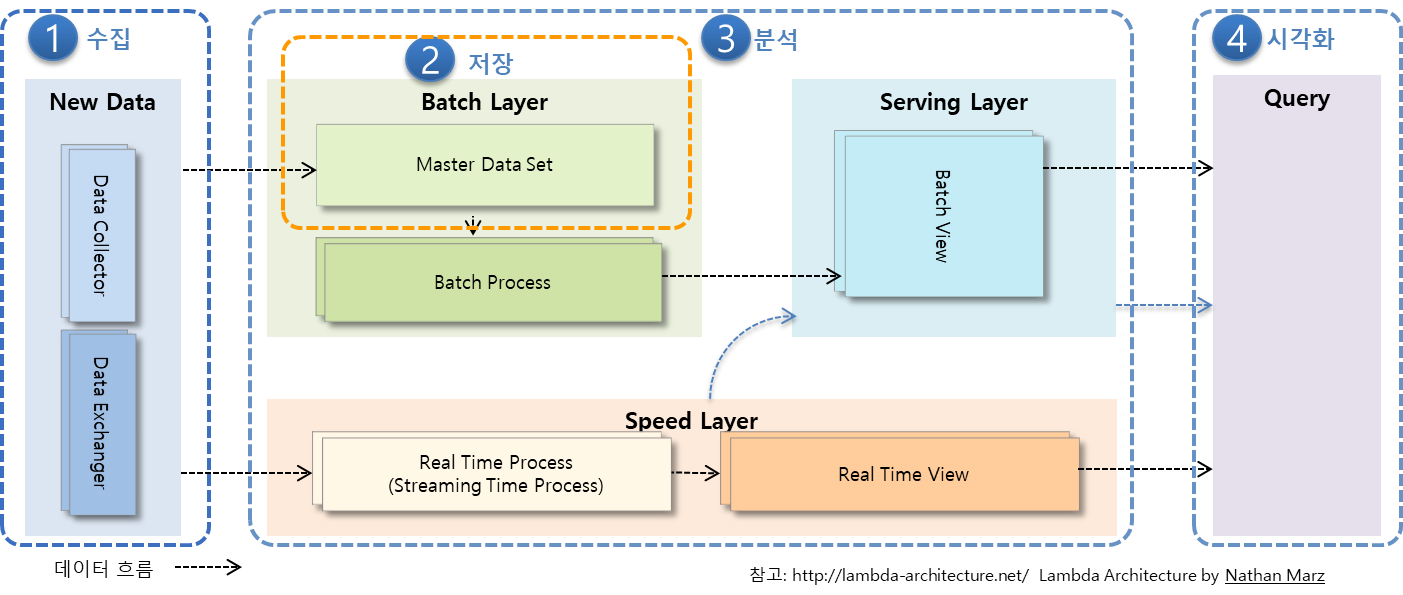
Lambda Architecture
실시간 분석을 지원하는 빅데이터 아키텍처
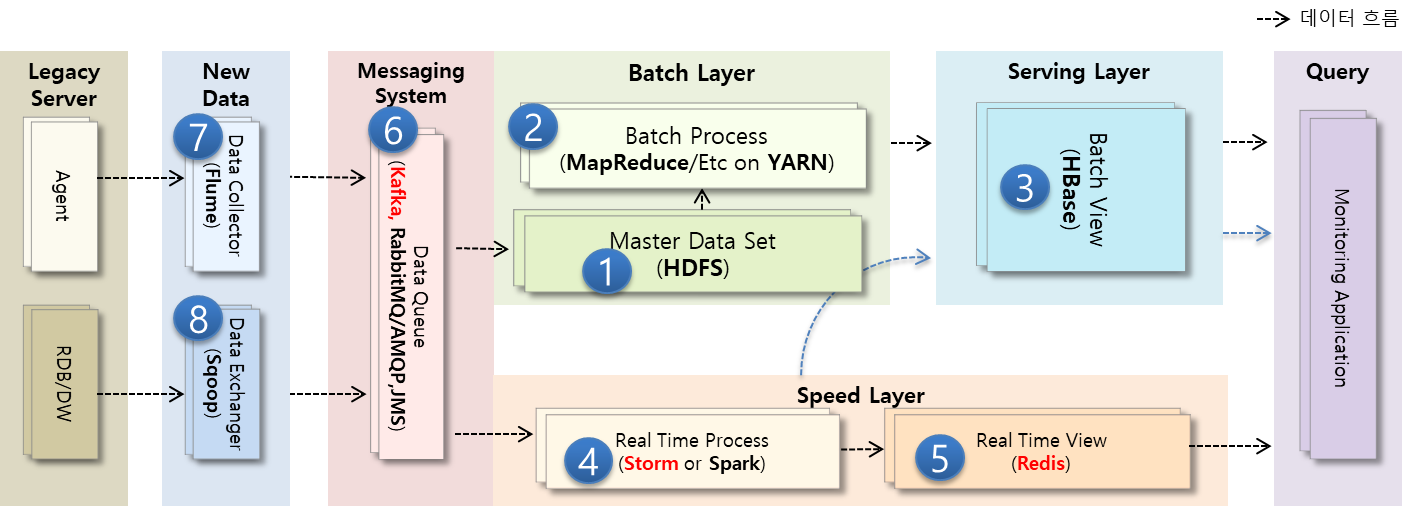
람다 아키텍처에 대한 솔루션 매핑 사례
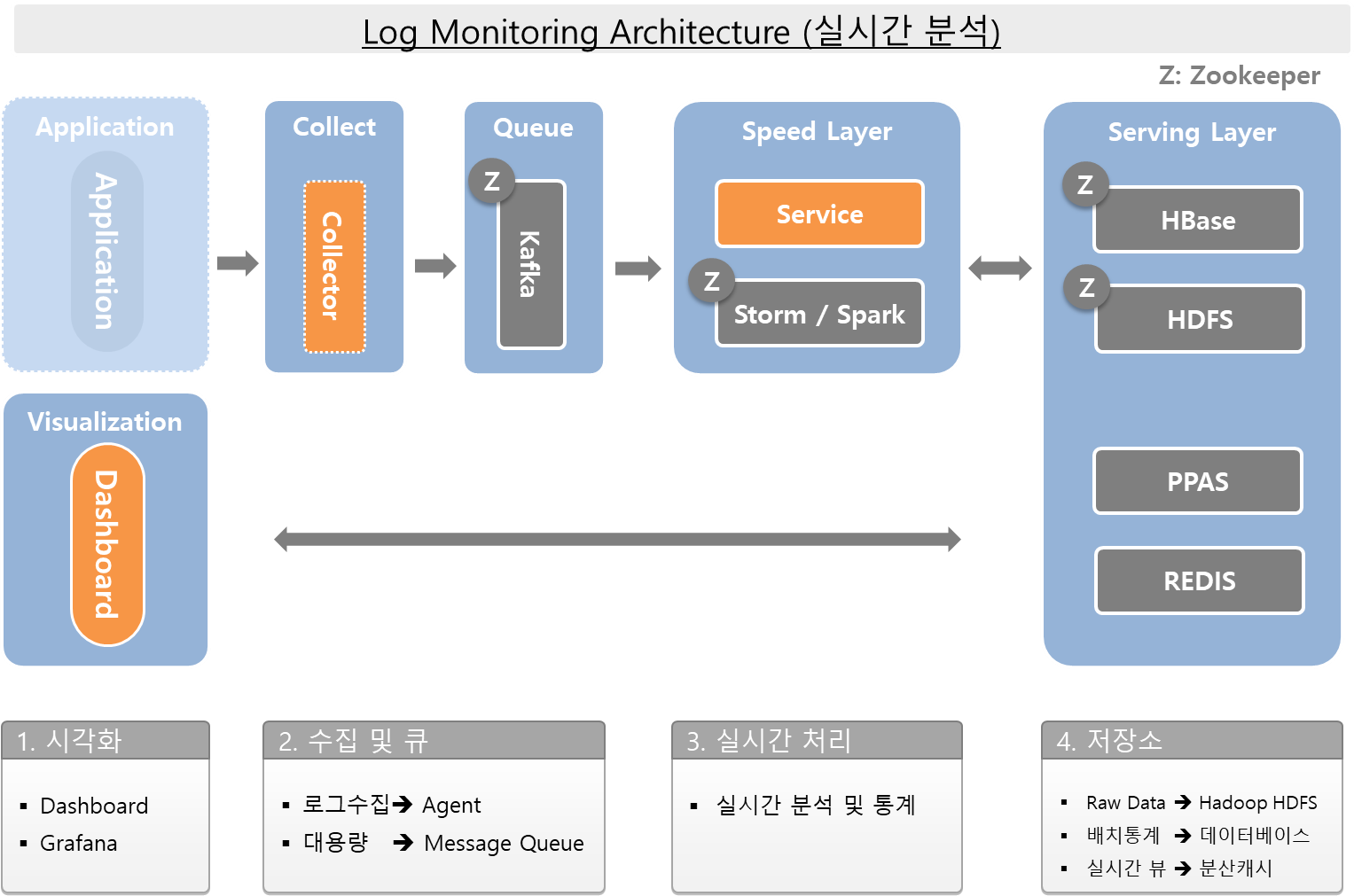
Monitoring Architecture(Reference)
Tech Stack
- Distributed Platform: Hadoop
- Data Store: HBase
- Distribute Codinator: Zookeeper
- Realtime Analysis: Storm or Spark
- Visualization: Grafana
- TSDB: InfluxDB
- Collect: Telegraf
- Message Queue: Kafka
- In Memory Data Grid: Redis
Other Hadoop-related projects at Apache include:
- Ambari
- A web-based tool for provisioning, managing, and monitoring Apache Hadoop clusters which includes support for Hadoop HDFS, Hadoop MapReduce, Hive, HCatalog, HBase, ZooKeeper, Oozie, Pig and Sqoop. Ambari also provides a dashboard for viewing cluster health such as heatmaps and ability to view MapReduce, Pig and Hive applications visually alongwith features to diagnose their performance characteristics in a user-friendly manner.
- Avro
- A data serialization system
- cf. Thrift, Protocol Buffers
- Hive
- A data warehouse infrastructure that provides data summarization and ad hoc querying.
- Pig
- A high-level data-flow language and execution framework for parallel computation.
- Spark
- A fast and general compute engine for Hadoop data. Spark provides a simple and expressive programming model that supports a wide range of applications, including ETL, machine learning, stream processing, and graph computation.
하둡 및 HBase를 이용한 대용량 테이블 설계
2.1 Hadoop
The Apache Hadoop software library is a framework that allows for the distributed processing of large data sets across clusters of computers using simple programming models.
- reliable, scalable, distributed computing
HDFS(Hadoop Distributed File System)
The Hadoop Distributed File System (HDFS) is a distributed file system designed to run on commodity hardware.
Assumptions and Goals
- Hardware Failure
- Streaming Data Access
- Write Once, Read Any Number Of Times, But Don’t Try To Change The Contents Of The File.
- Throughput > Latency
- Large Data Sets
- Simple Coherency Model
- “Moving Computation is Cheaper than Moving Data”
- Potability Across Heterogeneous Hardware and Software Platforms
HDFS Architecture
Master-Slave architecture

NameNode
- 파일 시스템의 네임스페이스를 관리
- 클라이언트의 파일 접근을 관리
- 파일 이름 변경, 파일과 디렉토리의 오픈/클로즈와 같은 파일 시스템 작업을 실행
DataNode
- 클라이언트의 요청을 읽어서 파일에 읽기/쓰기 작업
- 블럭의 생성, 삭제, 복제와 같은 작업을 수행
Block
- 여러 데이터 노드에 작은 파일로 나뉜다음 분산되어 저장
- 블럭의 기본크기는 64MB, HDFS 설정에 따라서 바꿀 수 있음
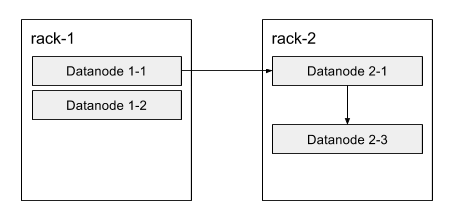
- 블럭을 보관할 노드의 선택
- 첫번째 복제는 원본과 같은 랙에 있는 노드를 선택
- 두번째와 세번째는 다른 랙에 보관
Operations
| Action | Command |
|---|---|
| Create a directory named /foodir | bin/hadoop dfs -mkdir /foodir |
| Remove a directory named /foodir | bin/hadoop fs -rm -R /foodir |
| View the contents of a file named /foodir/myfile.txt | bin/hadoop dfs -cat /foodir/myfile.txt |
Hadoop 기본 포트
| 파라미터 | 기본값 | 용도 | 설정 파일 |
|---|---|---|---|
| dfs.secondary.http.address | 50090 | SecondaryNameNode 웹 서버 주소 및 포트 | hdfs-site.xml |
| dfs.datanode.address | 50010 | DataNode 주소 및 포트 | hdfs-site.xml |
| dfs.datanode.http.address | 50075 | DataNode 웹 서버 용 주소 및 포트 | hdfs-site.xml |
| dfs.datanode.ipc.address | 50020 | DataNode ipc 서버용 주소 및 포트 | hdfs-site.xml |
| dfs.http.address | 50070 | NameNode 웹 어드민용 주소 및 포트 | hdfs-site.xml |
| mapred.job.tracker.http.address | 50030 | JobTracker 웹 서버용 주소 및 포트 | mapred-site.xml |
| mapred.task.tracker.http.address | 50060 | TaskTracker 웹 서버용 웹 주소 및 포트 | mapred-site.xml |
Apache Hadoop API
pom.xml
<dependency>
  <groupId>org.apache.hadoop</groupId>
  <artifactId>hadoop-client</artifactId>
  <version>2.7.1</version>
</dependency>
HDFSClient.java
System.setProperty("HADOOP_USER_NAME", "vagrant");
UserGroupInformation ugi = UserGroupInformation.createRemoteUser("vagrant");

Configuration conf = new Configuration();
conf.set("fs.default.name", "hdfs://hadoop01:9000");

FileSystem dfs = FileSystem.get(conf);

System.out.println("Home Path : " + dfs.getHomeDirectory());
System.out.println("Work Path : " + dfs.getWorkingDirectory());

Path filenamePath = new Path("/tmp/hello.txt");
System.out.println("File Exists : " + dfs.exists(filenamePath));

if (dfs.exists(filenamePath)) {
  dfs.delete(filenamePath, true);
}

FSDataOutputStream out = dfs.create(filenamePath);
out.writeUTF("Hello, world!\n");
out.close();

FSDataInputStream in = dfs.open(filenamePath);
String messageIn = in.readUTF();
System.out.print(messageIn);

in.close();
dfs.close();
실행결과
[vagrant@hadoop03 ~]$ hadoop fs -ls /tmp
Found 1 items
-rw-r--r--   3 vagrant supergroup         16 2018-01-24 19:47 /tmp/hello.txt
[vagrant@hadoop03 ~]$ hadoop fs -cat /tmp/hello.txt
 Hello, world!
Map & Reduce
Apache Hadoop NextGen MapReduce (YARN)
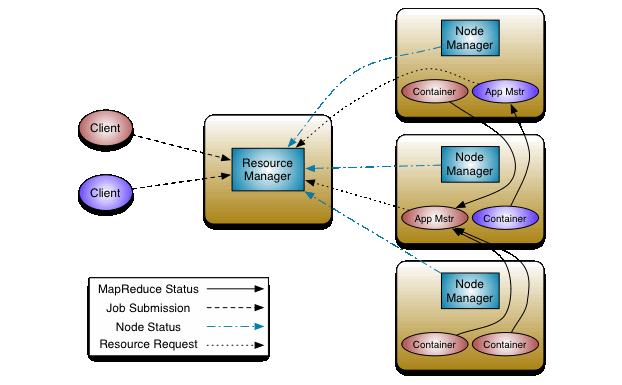
Functional Programming
Map
- Data Processing
Reduce
- Merge
2.2 HBase
Apache HBase™ is the Hadoop database, a distributed, scalable, big data store.
- NoSQL
- Schemaless
- 가용성과 확장성
- Region 서버만 추가하여 확장성 및 가용성 확보가 용이
- 단, 특정 Region 서버에 부하가 집중되면 성능저하가 발생 -> 로우키 설계가 중요
- Apache Phoenix: Add SQL Layer
Column Family
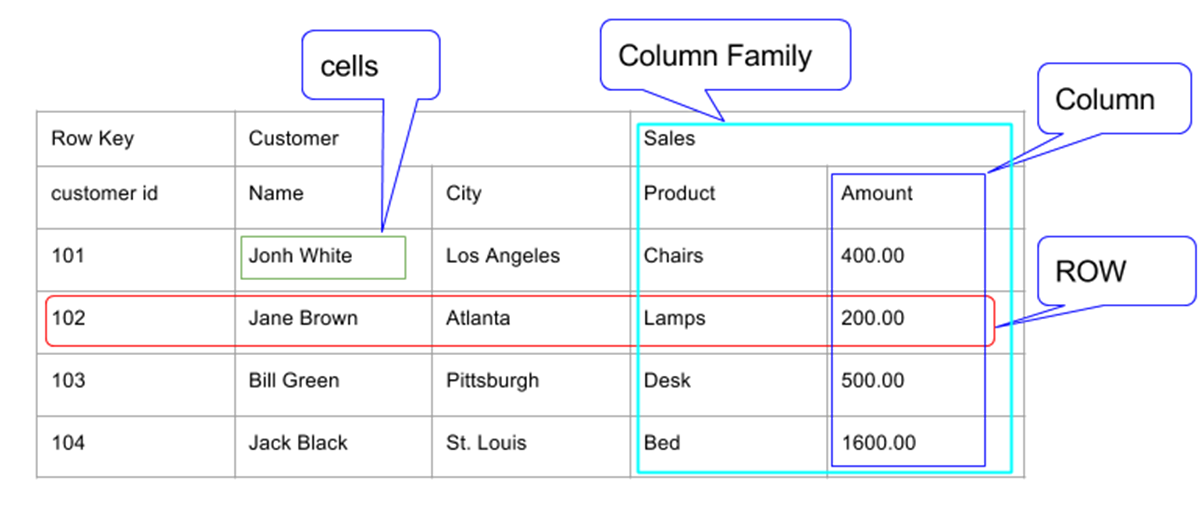
- 이 테이블은 Customer와 Sales 두 개의 컬럼 패밀리를 가지고 있다.
- Customer 컬럼 패밀리는 Name과 City 두 개의 컬럼을 가지고 있다.
- Sales 컬럼 패밀리는 Product와 Amount 두 개의 컬럼을 가지고 있다.
- Row는 Row Key, Customer CF, Sales CF로 구성된다.
특징
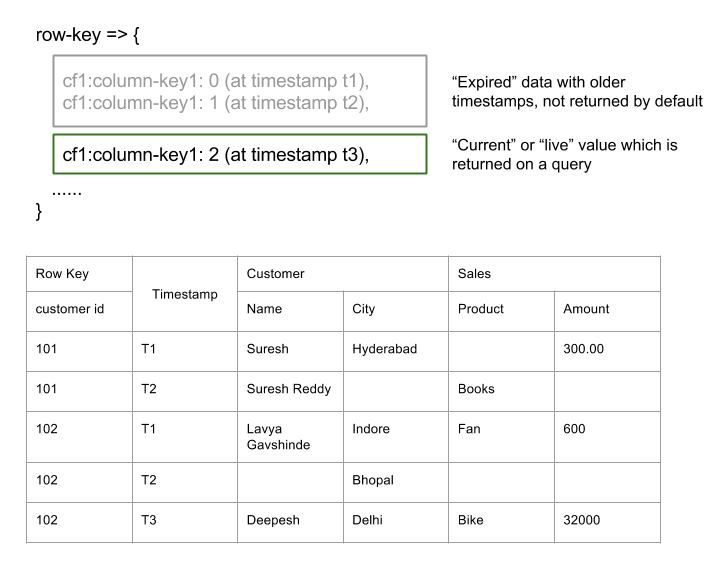
- Sparse: HBase는 sparse matrix(희소행렬)방식으로 데이터를 저장 할 수 있다. 예컨데 굳이 모든 필드에 값을 채울 필요가 없다는 얘기다.
- Column Oriented: RDBMS는 row 단위로 데이터를 저장한다. 하지만 HBase는 Sparse하기 때문에, 컬럼 단위로 데이터를 읽고 쓸 수 있다.
- Distributed: 테이블은 수백만개의 Row와 컬럼들로 구성된다. 이들 컬럼들은 쉽게 분산 할 수 있다.
- Versioned: 위 테이블은 Customer ID를 Row key로 사용하고 있다. 당연하지만 고객은 하나 이상의 물건을 구매할 수 있기 때문에 하나의 row key에 여러 개의 row를 저장 할 수 있다. 이 경우 Timestamp가 버전이 되며, 질의를 할 경우 가장 최근 timestamp의 row를 읽어 온다.
- Non-relational: 관계형 데이터베이스의 ACID 속성을 따르지 않는다.
Architecture
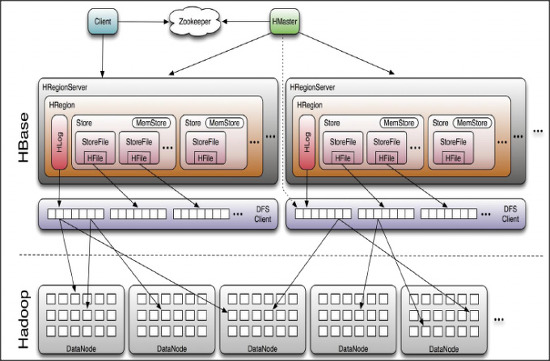
- HMaster
- RegionServer 와 META 데이터 관리
- HRegionServer
- Region 관리
- HResion
- 테이블 데이터의 부분집합이며, 수평확장의 기본단위
- HLog
- HFile
HBase HMaster
각 테이블의 데이터는 HRegionServer가 관리하며, 전체 클러스터는 HMaster가 관리한다.
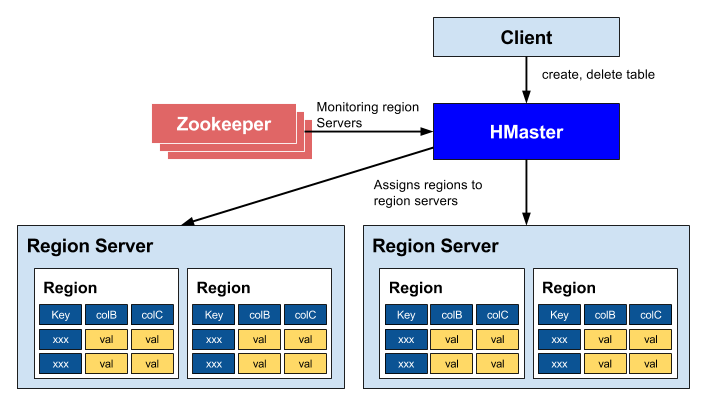
- 리전 서버들을 조정
- 리전의 시작을 관리
- 클러스터에 있는 모든 리전 서버들을 모니터링
- 관리 기능
- 테이블의 생성, 삭제, 업데이트
HBase Catalog Tables
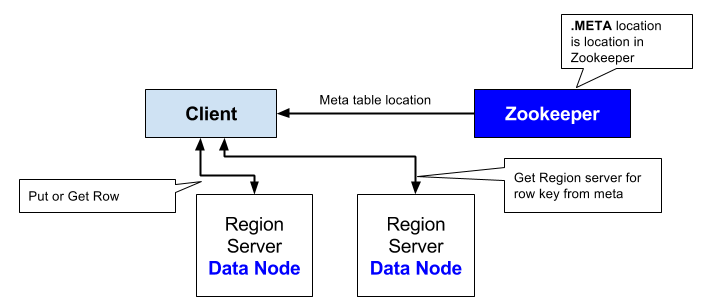
- 클라이언트는 주키퍼의 META 테이블을 서비스하는 리전 서버의 호스트 정보를 읽어온다.
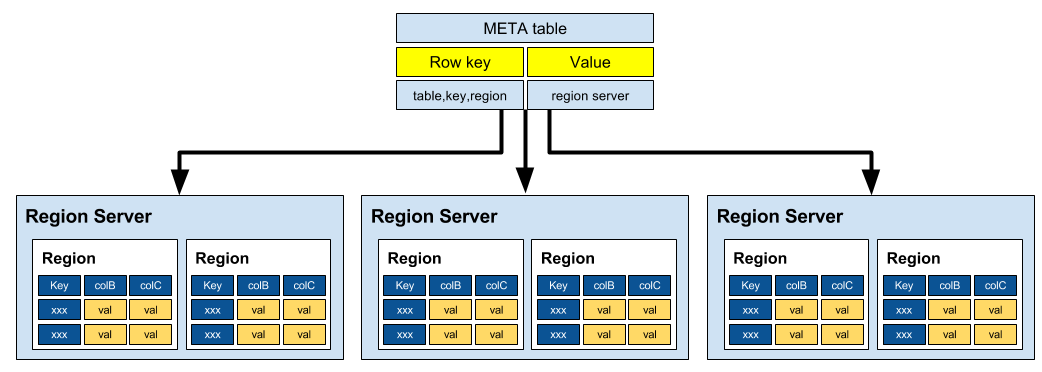
- META 테이블
- 클러스터에 포함된 모든 리전정보 저장
- -ROOT-, .META.
데이터를 찾는 방법
- ZooKeeper -> -Root- -> Region Server -> .META. -> Region -> Row
HBase Region Server
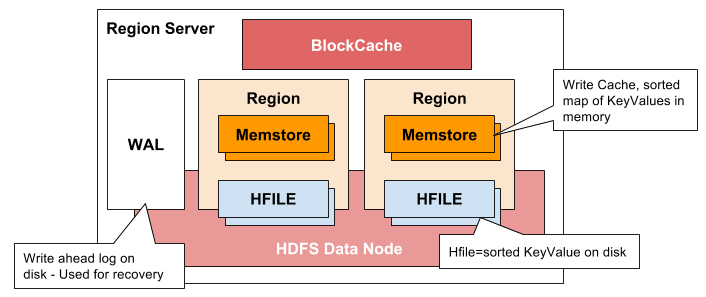
- 클라이언트와 통신을 하고 데이터 관련 연산을 관리
- 내부 region의 읽기와 쓰기 요청을 관리
- Region Server Components
- WAL(Write Ahead Log)
- 데이터 저장 실패를 복구하기 위해서 사용
- BlockCache
- 읽기 캐시
- MemStore
- 쓰기 캐시
- 각 리전의 컬럼 패밀리당 하나
- HFile
- WAL(Write Ahead Log)
HBase Minor Compaction
- 데이터를 입력하다 보면 여러 개의 작은 HFile들이 만들어진다.
- 파일들이 많아지면 성능이 떨어질 수 있는데,
- Minor compaction은 여러 개의 HFile들을 하나의 큰 HFile로 통합
- HFile에 저장된 데이터는 정렬되어 있으므로 merge sort를 이용해서 빠르게 합병
HBase Major Compaction
- Major compaction은 리전에 있는 모든 HFiles들을 모아서 컬럼당 하나의 HFile로 만든다.
- 이 과정에서 필요없는 셀, 시간이 초과된 셀등을 제거해서 전반적인 읽기 성능을 높인다.
- 대량의 파일들에 대한 읽기/쓰기 작업이 일어나기 때문에 디스크 I/O와 트래픽 증가가 발생
- Major compaction은 자동으로 실행하도록 예약
- 서비스에 미치는 영향을 최소화하기 위해서 주말이나 야간으로 스케줄링
HBASE vs RDBMS
| HBase | RDBMS |
|---|---|
| 스키마가 없다. column families만으로 이용 | 테이블의 구조를 기술하는 스키마 |
| 수평적으로 확장성이 있어 큰 테이블에 적합 | 확장하기 어려우며, 크기가 작은 테이블을 위해 생성 |
| Transaction이 존재하지 않음 | Transaction이 존재 |
| 비 일반화된 데이터 | 일반화된 데이터 |
| 덜 구조화된 데이터가 적합 | 구조화된 데이터에 적합 |
| get / put / scan 등 | SQL |
| MapReduce Join 활용 | Join에 최적화 됨 |
| RowKey만 인덱스 지원 | 임의 컬럼에 대한 인덱스 지원 |
| 초당 수십만건 Read/Write | 초당 수천건 Read/Write |
| 단일로우 트랜잭션 보장 | 다중 로우 트랜잭션 보장 |
HBase 사용법
1. Connect to HBase
$ ./bin/hbase shell
hbase(main):001:0>
2. Create a table
hbase(main):001:0> create 'test', 'cf'
0 row(s) in 0.4170 seconds

=> Hbase::Table - test
3. List Information About your Table
hbase(main):002:0> list 'test'
TABLE
test
1 row(s) in 0.0180 seconds

=> ["test"]
4. Put data into your table.
hbase(main):003:0> put 'test', 'row1', 'cf:a', 'value1'
0 row(s) in 0.0850 seconds

hbase(main):004:0> put 'test', 'row2', 'cf:b', 'value2'
0 row(s) in 0.0110 seconds

hbase(main):005:0> put 'test', 'row3', 'cf:c', 'value3'
0 row(s) in 0.0100 seconds
5. Scan the table for all data at once.
hbase(main):006:0> scan 'test'
ROW                                      COLUMN+CELL
 row1                                    column=cf:a, timestamp=1421762485768, value=value1
 row2                                    column=cf:b, timestamp=1421762491785, value=value2
 row3                                    column=cf:c, timestamp=1421762496210, value=value3
3 row(s) in 0.0230 seconds
6. Get a single row of data.
hbase(main):007:0> get 'test', 'row1'
COLUMN                                   CELL
 cf:a                                    timestamp=1421762485768, value=value1
1 row(s) in 0.0350 seconds
7. Disable a table.
hbase(main):008:0> disable 'test'
0 row(s) in 1.1820 seconds

hbase(main):009:0> enable 'test'
0 row(s) in 0.1770 seconds
8. Drop the table.
hbase(main):011:0> drop 'test'
0 row(s) in 0.1370 seconds
9. HBase scan option
사용법 : scan “$TABLE_NAME”, {$OPTION => $VALUE} (옵션 여러개 가능)
# 1) LIMIT : 출력할 row 수 제한
scan "$TABLE_NAME", {LIMIT => 10}

# 2) STARTROW / STOPROW : 출력할 row 범위 제한
scan "$TABLE_NAME", {STARTROW => "$START_KEY", STOPROW => "$STOP_KEY"}

# 3) COLUMNS : 원하는 column 출력(column은 columnFamily:columnQualifire 형태, CF:CQ)
scan "$TABLE_NAME", {COLUMNS => "$CF:$CQ"}

# 4) TIMERANGE : 특정 타임스탬프 사이의 값 조회
scan "$TABLE_NAME", {TIMERANGE => [ts1, ts2]}

# 5) ROWPREFIXFILTER : 특정 row key를 조회
scan "$TABLE_NAME", {ROWPREFIXFILTER => "$ROWKEY"}
10. HBase Filters
사용법 : scan “$TABLE_NAME”, {FILTER => “$filtername(‘$value’)”}
scan "$TABLE_NAME", {OPTION => VALUE, FILTER => "FILTERNAME('VALUE')"}
11. Exit the HBase Shell.
hbase(main):006:0> quit
sample.txt
create 'test', 'cf'
list 'test'
put 'test', 'row1', 'cf:a', 'value1'
put 'test', 'row2', 'cf:b', 'value2'
put 'test', 'row3', 'cf:c', 'value3'
put 'test', 'row4', 'cf:d', 'value4'
scan 'test'
get 'test', 'row1'
disable 'test'
enable 'test'
HBase Java Client Example
HBase Data Structure
Family1:{
   'Qualifier1':'row1:cell_data',
   'Qualifier2':'row2:cell_data',
   'Qualifier3':'row3:cell_data'
}
Family2:{
   'Qualifier1':'row1:cell_data',
   'Qualifier2':'row2:cell_data',
   'Qualifier3':'row3:cell_data'
}
HBase Client Maven Dependency
<dependency>
  <groupId>org.apache.hbase</groupId>
  <artifactId>hbase-client</artifactId>
  <version>${hbase.version}</version>
</dependency>
<dependency>
  <groupId>org.apache.hbase</groupId>
  <artifactId>hbase</artifactId>
  <version>${hbase.version}</version>
  <type>pom</type>
</dependency>
1. Connecting to HBase
hbase-site.xml
<configuration>
  <property>
    <name>hbase.zookeeper.quorum</name>
    <value>hadoop01</value>
  </property>
  <property>
    <name>hbase.zookeeper.property.clientPort</name>
    <value>2181</value>
  </property>
</configuration>
Configuration config = HBaseConfiguration.create();

String path = this.getClass()
  .getClassLoader()
  .getResource("hbase-site.xml")
  .getPath();
config.addResource(new Path(path));

HBaseAdmin.checkHBaseAvailable(config);
2. Createing a Database Structure
private TableName table1 = TableName.valueOf("Table1");
private String family1 = "Family1";
private String family2 = "Family2";
Connection connection = ConnectionFactory.createConnection(config)
Admin admin = connection.getAdmin();
HTableDescriptor desc = new HTableDescriptor(table1);
desc.addFamily(new HColumnDescriptor(family1));
desc.addFamily(new HColumnDescriptor(family2));
admin.createTable(desc);
3. Adding and Retrieving Elements
byte[] row1 = Bytes.toBytes("row1")
Put p = new Put(row1);
p.addImmutable(family1.getBytes(), qualifier1, Bytes.toBytes("cell_data"));
table1.put(p);
Get g = new Get(row1);
Result r = table1.get(g);
byte[] value = r.getValue(family1.getBytes(), qualifier1);
Bytes.bytesToString(value)
4. Scanning and Filtering
Filter filter1 = new PrefixFilter(row1);
Filter filter2 = new QualifierFilter(
  CompareOp.GREATER_OR_EQUAL,
  new BinaryComparator(qualifier1));
List<Filter> filters = Arrays.asList(filter1, filter2);
Scan scan = new Scan();
scan.setFilter(new FilterList(Operator.MUST_PASS_ALL, filters));
scan.addColumn(family1.getBytes(), qualifier1);

ResultScanner scanner = table.getScanner(scan);
for (Result result : scanner) {
    System.out.println("Found row: " + result);
}
5. Deleting Rows
Delete delete = new Delete(row1);
delete.addColumn(family1.getBytes(), qualifier1);
table.delete(delete);
Apache Phoenix
Phoenix is an open source SQL skin for HBase.
You use the standard JDBC APIs instead of the regular HBase client APIs to create tables, insert data, and query your HBase data.
특징
- HBase 데이터에 대한 빠른 접근이 가능
- MapReduce를 사용하지 않고 SQL 쿼리를 Native HBase 명령어로 컴파일하여 수행
- 추가적인 서버가 필요하지 않기 때문에 비교적 가벼움
- 기존에 존재하는 HBase 테이블과의 매핑이 가능
장점
- JOIN
- Paging
- OFFSET & LIMIT (ex. LIMIT 10 OFFSET 10)
- Secondary Index
- Salted Tables
- Splitting: pre-split on salt bytes boundaries
- ex. new_row_key = (++index % BUCKETS_NUMBER) + original_key
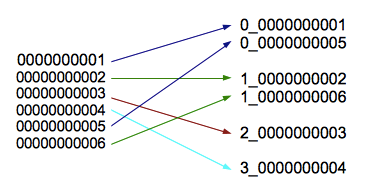
- ex. new_row_key = (++index % BUCKETS_NUMBER) + original_key
- Row Key Ordering: phoenix.query.rowKeyOrderSaltedTable=true
- CREATE TABLE table (a_key VARCHAR PRIMARY KEY, a_col VARCHAR) SALT_BUCKETS = 20;
- Splitting: pre-split on salt bytes boundaries
Apache Phoenix Java Client Example
Phoenix Driver Maven Dependency
<dependency>
  <groupId>org.apache.phoenix</groupId>
  <artifactId>phoenix-core</artifactId>
  <version>4.13.1-HBase-1.2</version>
</dependency>
PhoenixExample.java
public class PhoenixExample {

	public static void main(String[] args) {
		// Create variables
		Connection connection = null;
		Statement statement = null;
		ResultSet rs = null;
		PreparedStatement ps = null;

		try {
			connection = DriverManager.getConnection("jdbc:phoenix:demo");
			statement = connection.createStatement();
			statement.executeUpdate("create table javatest (mykey integer not null primary key, mycolumn varchar)");
			statement.executeUpdate("upsert into javatest values (1,'Hello')");
			statement.executeUpdate("upsert into javatest values (2,'Java Application')");
			connection.commit();

			ps = connection.prepareStatement("select * from javatest");
			rs = ps.executeQuery();

			System.out.println("Table Values");
			while (rs.next()) {
				Integer myKey = rs.getInt(1);
				String myColumn = rs.getString(2);
				System.out.println("\tRow: " + myKey + " = " + myColumn);
			}
		} catch (SQLException e) {
			e.printStackTrace();
		} finally {
			try {
				ps.close();
				rs.close();
				statement.close();
				connection.close();
			} catch (Exception e) {
			}
		}
	}
}
2.3 ZooKeeper
A Distributed Coordination Service for Distributed Applications
- 설정 정보 관리
- 노드 리스트 관리
- 리더선정(쓰기 명령을 총괄)
ZooKeeper Architecture
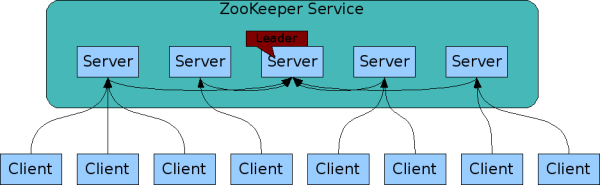
Desigh Goals
- ZooKeeper is simple.
- ZooKeeper allows distributed processes to coordinate with each other through a shared hierarchal namespace which is organized similarly to a standard file system.
- Zookeeper is replicated.
- ZooKeeper itself is intended to be replicated over a sets of hosts called an ensemble.
- Zookeeper is ordered.
- ZooKeeper stamps each update with a number that reflects the order of all ZooKeeper transactions.
- Zookeeper is fast.
- It is especially fast in “read-dominant” workloads.
Data model and the hierarchical namespace

Nodes and ephemeral nodes
- each node in a ZooKeeper namespace can have data associated with it as well as children.
- These znodes exists as long as the session that created the znode is active.
Simple API
| operation | desc |
|---|---|
| create | creates a node at a location in the tree |
| delete | deletes a node |
| exists | tests if a node exists at a location |
| get data | reads the data from a node |
| set data | writes data to a node |
| get children | retrieves a list of children of a node |
| sync | waits for data to be propagated |
Example
Maven Dependency
<dependency>
	<groupId>org.apache.zookeeper</groupId>
	<artifactId>zookeeper</artifactId>
	<version>3.4.8</version>
</dependency>
ZNodeTest.java
public class ZNodeTest {

    public static void main(String[] args) {
        int sessionTimeout = 10 * 100;

        // 1. ZooKeeper 서버(클러스터)에 연결
        ZooKeeper zk = null;

        try {
            zk = new ZooKeeper("demo:2181", sessionTimeout, null);

            // 2. Test01 znode가 존재하지 않으면 /test01, /test02 생성
            if (zk.exists("/test01", false) == null) {
                zk.create("/test01", "test01_data".getBytes(), Ids.OPEN_ACL_UNSAFE, CreateMode.PERSISTENT);
                zk.create("/test02", "test02_data".getBytes(), Ids.OPEN_ACL_UNSAFE, CreateMode.PERSISTENT);
            }

            // 3 /test01 노드의 자식 노드로 sub01, sub02 생성
            zk.create("/test01/sub01", null, Ids.OPEN_ACL_UNSAFE, CreateMode.EPHEMERAL);
            zk.create("/test01/sub02", null, Ids.OPEN_ACL_UNSAFE, CreateMode.EPHEMERAL);

            // 4. /test01 노드의 데이터 가져오기
            byte[] test01Data = zk.getData("/test01", false, null);
            System.out.println("getData [/test01]: " + new String(test01Data));

            // 5. /test01/sub01 노드의 데이터를 새로운 값으로 설정
            zk.setData("/test01/sub01", "this new Data".getBytes(), -1);
            byte[] subData = zk.getData("/test01/sub01", false, null);
            System.out.println("getData after setData [/test01/sub01]: " + new String(subData));

            // 6. 노드가 존재하는지 확인
            System.out.println("exist [/test01/sub01]: " + (zk.exists("/test01/sub01", false) != null));
            System.out.println("exist [/test01/sub03]: " + (zk.exists("/test01/sub03", false) != null));

            // 7. /test01의 자식노드 목록 가져오기
            List<String> children = zk.getChildren("/test01", false);
            for (String eachChildren : children) {
                System.out.println("getChildren [/test01]: " + eachChildren);
            }
        } catch (IOException | KeeperException | InterruptedException e) {
            e.printStackTrace();
        } finally {
            // 8. zk 죵료
            try {
                zk.close();
            } catch (InterruptedException e) {
                e.printStackTrace();
            }
        }
    }
}
Storm 을 이용한 실시간 데이터 분석
Apache Storm is a free and open source distributed realtime computation system.
데이타 스트림과 실시간 분석
- 시간을 축으로 하여 계속해서 생성되는 데이터
- 배치 분석 vs. 실시간 분석
- 마케팅과 같이 실시간 대응이 중요한 경우에는 데이터 스트림을 실시간 으로 분석
- EX> 이벤트 감지를 통한 이상 거래 탐지(Fraud Detection)
Storm 특징
- Integrates
- Storm integrates with any queueing system and any database system.
- Simple API
- Scalable
- Storm was benchmarked at processing one million 100 byte messages per second per node on hardware with the following specs:
- Processor: 2x Intel E5645@2.4Ghz
- Memory: 24 GB
- Storm was benchmarked at processing one million 100 byte messages per second per node on hardware with the following specs:
- Fault tolerant
- Guarantees data processing
- Using Trident, a higher level abstraction over Storm’s basic abstractions, you can achieve exactly-once processing semantics.
- Use with any language
- Easy to deploy and operate
- Free and open source
- Apache Storm is a free and open source project licensed under the Apache License, Version 2.0
Storm Architecture
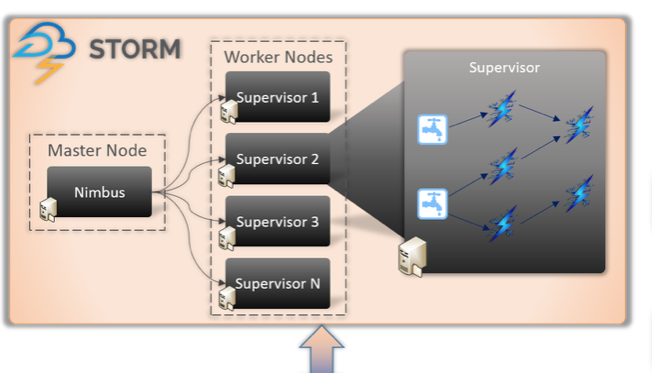
- Nimbus -> Master Node
- Supervisor -> Worker Node
Storm Components
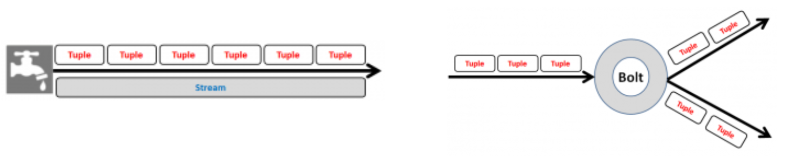
- Spout: Spout is the entry point in a storm topology.
- Bolt: Bolt contains the actual processing logic.
- Topology: Topology is a network of spouts and bolts
- Stream: A stream is an unbounded sequence of tuples
- Tuple: Tuple is the most basic data structure in storm . Its a named list of values.
Storm Parallelism
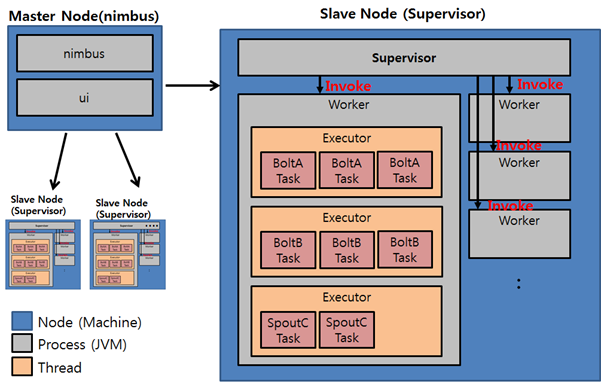
- Node
- Nimbus나 Supervisor 프로세스가 기동되는 물리적인 서버
- Worker
- Supervisor가 있는 노드에서 기동되는 자바 프로세스
- Executor
- Worker내에서 수행되는 자바 쓰레드
- Task
- Bolt 및 Spout 객체
Example of a running topology

Config conf = new Config();
conf.setNumWorkers(2); // use two worker processes

topologyBuilder.setSpout("blue-spout", new BlueSpout(), 2); // set parallelism hint to 2

topologyBuilder.setBolt("green-bolt", new GreenBolt(), 2)
               .setNumTasks(4)
               .shuffleGrouping("blue-spout");

topologyBuilder.setBolt("yellow-bolt", new YellowBolt(), 6)
               .shuffleGrouping("green-bolt");

StormSubmitter.submitTopology(
        "mytopology",
        conf,
        topologyBuilder.createTopology()
    );
Stream groupings
볼트의 작업간에 스트림을 분할하는 방법을 정의
Storm에는 8 개의 내장 된 스트림 그룹이 있으며 CustomStreamGrouping 인터페이스를 구현하여 사용자 정의 스트림 그룹을 구현할 수 있다.
- Shuffle grouping : 튜플은 각 볼트가 같은 수의 튜플을 확보 할 수 있도록 볼트 작업에 무작위로 분산
- Fields grouping : 스트림은 그룹화에 지정된 필드로 분할. 예를 들어 스트림이 “user-id”필드로 그룹화 된 경우 동일한 “사용자 ID”를 가진 튜플은 항상 동일한 작업으로 이동하지만 다른 “사용자 ID”가 있는 튜플은 다른 작업으로 갈 수 있다.
- All grouping : 모든 볼트 작업에서 스트림이 복제
- Global grouping : 전체 스트림이 볼트 작업 중 하나만 수행. 특히, ID가 가장 낮은 작업으로 이동
- Direct grouping : 튜플의 제작자가 소비자의 어떤 작업이이 튜플을 수신 할 것인지를 결정
Storm Example
1. HelloTopology Example
pom.xml
<dependency>
  <groupId>org.apache.storm</groupId>
  <artifactId>storm-core</artifactId>
  <version>1.1.1</version>
  <scope>provided</scope>
</dependency>
HelloSpout.java
public class HelloSpout extends BaseRichSpout {
	private SpoutOutputCollector collector;

	public void open(Map conf, TopologyContext context, SpoutOutputCollector collector) {
		this.collector = collector;
	}

	public void nextTuple() {
		this.collector.emit(new Values("Hello World!"));
	}

	public void declareOutputFields(OutputFieldsDeclarer declarer) {
		declarer.declare(new Fields("say"));
	}
}
HelloBolt.java
public class HelloBolt extends BaseBasicBolt {

	private static final long serialVersionUID = 1L;

	public void execute(Tuple tuple, BasicOutputCollector collector) {
		String value = tuple.getStringByField("say");
		System.out.println("Tuple value is " + value);
	}

	public void declareOutputFields(OutputFieldsDeclarer declarer) {
	}
}
HelloTopology.java
public class HelloTopology {
	public static void main(String args[]) throws Exception {
		TopologyBuilder builder = new TopologyBuilder();
		builder.setSpout("HelloSpout", new HelloSpout(), 2);
		builder.setBolt("HelloBolt", new HelloBolt(), 4).shuffleGrouping("HelloSpout");

		Config conf = new Config();
		conf.setDebug(true);

		// If there are arguments, we are running on a cluster
		if (args != null && args.length > 0) {
			// parallelism hint to set the number of workers
			conf.setNumWorkers(3);
			// submit the topology
			StormSubmitter.submitTopology(args[0], conf, builder.createTopology());
		}
		// Otherwise, we are running locally
		else {
			LocalCluster cluster = new LocalCluster();

			cluster.submitTopology("HelloTopologyLocal", conf, builder.createTopology());
			Utils.sleep(10000);

			// kill the LearningStormTopology
			cluster.killTopology("HelloTopologyLocal");
			// shutdown the storm test cluster
			cluster.shutdown();
		}
	}
}
2. 빌드 및 배포
$ mvn clean package -DskipTests=true
$ storm jar storm-0.0.1-SNAPSHOT.jar hello.HelloTopology HelloTopology
Kafka 및 Redis 활용
4.1 Kafka
A distributed streaming platform
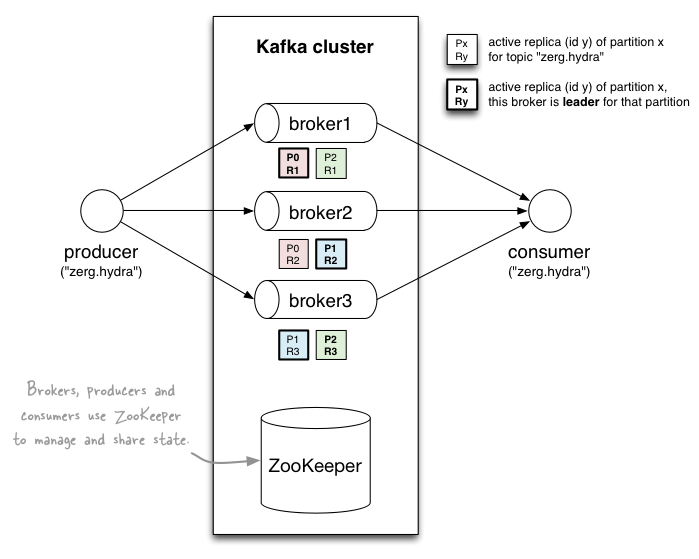
First a few concepts:
- Kafka is run as a cluster on one or more servers.
- The Kafka cluster stores streams of records in categories called topics.
- Each record consists of a key, a value, and a timestamp.
Topics and Logs
Kafka 클러스터는 다음과 같은 파티션 로그를 유지

- 보존 기간을 사용하여 레코드를 보유
- 오프셋은 소비자가 제어
- 병렬처리의 단위
Guarantees
- 생산자가 특정 주제 파티션으로 보낸 메시지는 전송 된 순서대로 추가
- 소비자 인스턴스는 로그에 저장된 순서대로 레코드를 봄
- 복제 인수 N이있는 항목의 경우 로그에 커밋 된 레코드를 손실하지 않고 최대 N-1 개의 서버 오류를 허용
Kafka as a Storage System
Kafka에 기록 된 데이터는 디스크에 기록되고 내결함성을 위해 복제
4.2 Kafka-Storm Example
pom.xml
<dependency>
	<groupId>org.apache.storm</groupId>
	<artifactId>storm-kafka</artifactId>
	<version>1.1.1</version>
</dependency>
<dependency>
	<groupId>org.apache.kafka</groupId>
	<artifactId>kafka-clients</artifactId>
	<version>0.10.0.1</version>
</dependency>
<dependency>
	<groupId>org.apache.kafka</groupId>
	<artifactId>kafka_2.11</artifactId>
	<version>0.10.0.1</version>
</dependency>
CutLogBolt.java
public class CutLogBolt extends BaseBasicBolt {

	private static final long serialVersionUID = 1L;

	@Override
	public void execute(Tuple input, BasicOutputCollector collector) {

		String[] splitArray = input.getString(0).split(";");
		String key = "";
		String doctype = "";

		for (int i = 0; i < splitArray.length; i++) {
			if (splitArray[i].contains("key"))
				key = splitArray[i];
			if (splitArray[i].contains("doctype"))
				doctype = splitArray[i];
		}
		collector.emit(new Values(key, doctype));
	}

	@Override
	public void declareOutputFields(OutputFieldsDeclarer declarer) {
		declarer.declare(new Fields("key", "doctype"));
	}
}
ClassifyKeyBolt.java
public class ClassifyKeyBolt extends BaseBasicBolt {

	private static final long serialVersionUID = 1L;

	@Override
	public void execute(Tuple input, BasicOutputCollector collector) {
		String[] splitdoctype = input.getStringByField("doctype").split(":");
		String[] splitkey = input.getStringByField("key").split(":");
		if (splitkey.length == 2 && splitdoctype.length == 2) {
			String doctype = splitdoctype[1].trim();
			String key = splitkey[1].trim();
			// System.err.println(key + ":" + doctype);
			collector.emit(new Values(key + ":" + doctype));
		}
	}

	@Override
	public void declareOutputFields(OutputFieldsDeclarer declarer) {
		declarer.declare(new Fields("subdoctype"));
	}
}
DoctypeCountBolt.java
public class DoctypeCountBolt extends BaseBasicBolt {

	private static final long serialVersionUID = 1L;

	Map<String, Integer> docMap = new HashMap<String, Integer>();

	@Override
	public void execute(Tuple input, BasicOutputCollector collector) {

		String doctype = input.getStringByField("subdoctype");

		Integer count = docMap.get(doctype);
		if (count == null)
			count = 0;

		count++;

		docMap.put(doctype, count);
		System.out.println(docMap);
		collector.emit(new Values(docMap));
	}

	@Override
	public void declareOutputFields(OutputFieldsDeclarer declarer) {
		declarer.declare(new Fields("docmap"));
	}
}
MonitorTopology.java
public class MonitorTopology {

	public static void main(String[] args) throws Exception {

		String zkUrl = "demo:2181";
		String brokerUrl = "demo:9092";

		System.out.println("Using Kafka zookeeper url: " + zkUrl + " broker url: " + brokerUrl);

		ZkHosts hosts = new ZkHosts(zkUrl);

		SpoutConfig spoutConfig = new SpoutConfig(hosts, "onlytest", "/onlytest", UUID.randomUUID().toString());
		spoutConfig.scheme = new SchemeAsMultiScheme(new StringScheme());
		KafkaSpout kafkaSpout = new KafkaSpout(spoutConfig);

		TopologyBuilder builder = new TopologyBuilder();
		builder.setSpout("spout", kafkaSpout, 1);
		builder.setBolt("cutbolt", new CutLogBolt(), 2).shuffleGrouping("spout");
		builder.setBolt("classifybolt", new ClassifyKeyBolt(), 2).fieldsGrouping("cutbolt", new Fields("key", "doctype"));
		builder.setBolt("docbolt", new DoctypeCountBolt(), 2).fieldsGrouping("classifybolt", new Fields("subdoctype"));

		Config conf = new Config();
		conf.setDebug(true);

		List<String> nimbus_seeds = new ArrayList<String>();
		nimbus_seeds.add("nimbus url");
		if (args != null && args.length > 0) {
			conf.setNumWorkers(3);
			StormSubmitter.submitTopologyWithProgressBar(args[0], conf, builder.createTopology());
		} else {
			conf.setNumWorkers(3);
			StormSubmitter.submitTopology("onlytest", conf, builder.createTopology());
		}
	}
}
빌드 및 배포
$ mvn clean package -DskipTests=true
$ storm jar storm-0.0.1-SNAPSHOT.jar monitor.MonitorTopology MonitorTopology
4.2 Redis(Remote Dictionary Server)
Redis is an open source (BSD licensed), in-memory data structure store, used as a database, cache and message broker
특징
- key-value data store
- value can be a string, list, set, sorted set or hash
Redis Java Example
pom.xml
<dependency>
    <groupId>redis.clients</groupId>
    <artifactId>jedis</artifactId>
    <version>2.9.0</version>
</dependency>
HelloRedis.java
public class HelloRedis {
	public static void main(String args[]) {
		JedisPool jedisPool = new JedisPool(new JedisPoolConfig(), "192.168.33.10");
		Jedis jedis = jedisPool.getResource();

		try {
			jedis.set("test1", "testValue1");
			jedis.set("test2", "testValue2");
			System.out.println("jedis Value 1 : " + jedis.get("test1"));
			System.out.println("jedis Value 2 : " + jedis.get("test2"));
			System.out.println(jedis.dbSize());
		} catch (JedisConnectionException e) {
		} finally {
			if (null != jedis) {
				jedisPool.close();
			}
		}

		jedisPool.destroy();
	}
}
Grafana 와 InfluxDB를 이용한 대시보드 구성
Dashboard Architecture

[출처링크] http://www.popit.kr/influxdb_telegraf_grafana_2/
Grafana
The open platform for beautiful analytics and monitoring
The leading open source software for the time series analytics
InfluxDB
InfluxDB is a Time Series Database built from the ground up to handle high write & query loads.
Telegraf
Telegraf is the Agent for Collecting & Reporting Metrics & Data